03 · CURRENT NOTEBOOK ANATOMY
Three panels.
Three different jobs.
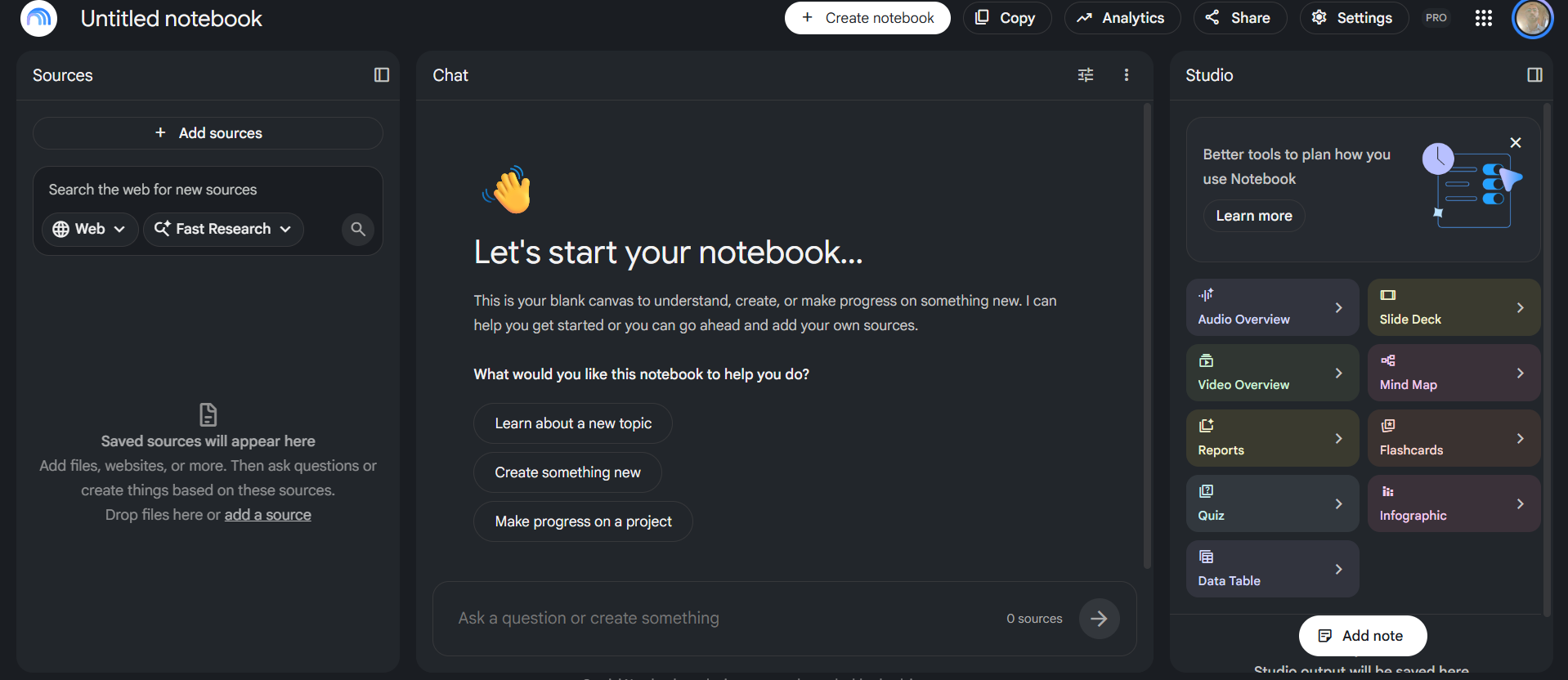
Your screenshot already shows the modern Notebook workflow: Sources on the left, source-grounded Chat in the middle, and Studio outputs on the right. The key is knowing when each panel should do the work.
LEFT PANEL
Sources = the evidence boundary
Add your files, webpages, Drive documents, audio, images and other supported source types here. More importantly, select only the sources relevant to the task.
- Fast Research / web discovery helps find sources.
- 5+ sources can be auto-labeled and categorized.
- Drive files can sync as they change.
MIDDLE PANEL
Chat = reasoning + planning
Use Chat to question, compare, sequence and diagnose the selected sources. This is where most teacher work should begin.
- Ask for citations.
- State what evidence to use.
- State the teaching decision you need.
- Do not ask Studio to create an artifact before you know why.
RIGHT PANEL
Studio = turn insight into an artifact
Studio currently includes Notes, Audio/Video Overviews, Mind Maps, Reports, Flashcards, Quizzes, Slide Decks, Infographics and Data Tables.
Teacher rule: Chat first; artifact second.